Purpose
The primary purpose of this blog post is to help you, dear reader, to browse the internet, exchange secure emails, exchange secure messages, and post to social media as anonymously as possible. But first, a little background.
In the United States at least, freedom of speech is enshrined as a Constitutional right, to wit:
Congress shall make no law respecting an establishment of religion, or prohibiting the free exercise thereof; or abridging the freedom of speech, or of the press; or the right of the people peaceably to assemble, and to petition the Government for a redress of grievances.
But nowhere in the US Constitution is there a requirement for a person to endanger their life or liberty as a prerequisite for exercising these rights. To the contrary, anonymous speech using a pen-name or nom de plume for purposes of political commentary is a long held tradition in America and world-wide.
Fans of the historically accurate documentary National Treasure are no doubt familiar with the Silence Dogood letters, which we now know were written by founding father Benjamin Franklin.

Thomas Paine’s Common Sense was published as “Written By an Englishman”, and the Federalist Papers were written by Alexander Hamilton, James Madison and John Jay, and published under the pen-name Publius. So wanting to express your opinions anonymously is a perfectly reasonable thing to do, and is fully in line with actions taken notable American patriots, even people who went on to be President or Chief Justice of the Supreme Court.
And while the advances in technology from revolutionary times until today have revolutionized the ease with which we communicate with each other, technology has made the need for anonymous communication even more necessary. In Ben Franklin’s day, considerable effort was required to engage in political discourse at a mass scale. One required access to a printing press, a lot of paper, and a network of horse-drawn conveyances for distribution. A single publication would take days or weeks to be disseminated. And tracking down the publisher was equally time consuming.
Today, with a few keystrokes, your message can published worldwide in seconds. Those in power with an authoritarian bent do not like this one bit, and are highly motivated to quash dissent by having their agents track down dissenters. And governments worldwide now dedicate considerable resources to doing just that. But with some care, dear reader, you can make their job considerably harder. Read on to learn how.
You’re Being Tracked
So you went into a private browser tab, logged onto reddit and created a new username and now you’re 100% anonymous. Right?
No, not even close.
Using your computer at home, or at your office, or even taking it to your local library or cafe still leaves a ton of identifiable breadcrumbs behind that can be used to track you. And your computer logs your activity, so you’re also creating a trove of evidence that forensic analysts can sift through.
Using your smartphone? Even worse. You’re leaving all the same breadcrumbs AND tying the activity to your precise location and the unique hardware identifier of your phone called an IMEI.

To access the internet anonymously, you need to start at the operating system level and install a privacy focused operating system. You need an operating system that doesn’t contain hidden unique IDs like Windows does. You need an operating system that doesn’t log your activity or ‘phone home’ to check for updates or send telemetry about you. You need TAILS.
The TOR Project has done all this work for you with a specialized, privacy focused operating system called TAILS. TAILS is designed to install on any USB thumb drive or even an old SD card from your camera. TAILS uses an anti-tracking technology called TOR - The Onion Router - which I will talk about later.
Here’s my TAILS setup. I grabbed an old micro SD card and a USB micro SD card reader that was collecting dust in the drawer, and within 30 minutes I was up and running. My SD card is 64 GB, which is more than enough. TAILS only needs 8 GB.
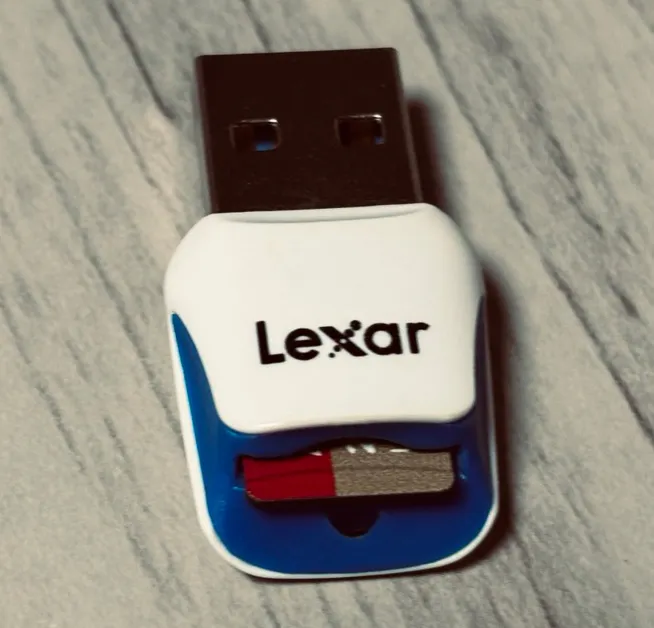
Now, when I want to access the internet anonymously, I put the USB into my laptop and reboot it using TAILS. (I’ll go into more detail on how to configure TAILS later).
How TAILS Stops Tracking
TAILS is a specialized Linux distribution maintained by the folks at the TOR Project, and it has TOR built-in. TOR - The Onion Router - is a system for encrypting and disguising your internet traffic that makes it extremely difficult to trace internet activity from your computer back to you.
TOR works by encrypting your network messages and then sending them to relay nodes, which then forward them on, eventually until your messages reach their intended destination. Replies back from that destination bounce back in the same way. This relay system has several privacy advantages:
- Someone monitoring your network traffic doesn’t know what website you visited.
- The website you visited can’t track your IP address, it just sees a TOR relay address.
- Your network traffic has extra layers of encryption, making it harder to decode.
- TOR also does many other things in the TOR browser to remove trackers and resist browser fingerprinting.
By using TOR to browse the internet you are already well ahead of the game, but there are a few notes of caution:
- Some websites will refuse to allow you to connect via TOR. They consider it a security risk,
- TOR makes your location appear to be very different from where you actually are. This can break services that have geographic restrictions.
- Web browsing speed will likely be much slower.
- An observer of your traffic can tell that you are using TOR, and thus conclude you are up to no good.
TOR alone is not perfect security and eventually, a well-funded and persistent opponent may be able to track your TOR traffic back to your home IP address. Because of this, I recommend you take your TAILS laptop on a road trip. Have a coffee at your local cafe, take a trip to the library, or sit in the park and enjoy municipal WIFI.
TOR will also help you on your road trip as it can do something called MAC address spoofing. Basically, your computer’s WIFI contains a unique serial number (called a MAC address) that can be traced back to you. If you go to Starbucks and connect your laptop to the WIFI, that serial number gets recorded, placing your laptop at that Starbucks for a specific time period. But with MAC address spoofing, TAILS fakes your MAC address, and that fake MAC address is what gets logged.
The other major thing TAILS does for you, is that the moment you reboot your computer, it forgets everything that you did. TAILS keeps all of its working data in RAM. TAILS never saves anything back to your USB drive. This means that your USB drive will never contain any record of what you did on the internet.

Requirements for TAILS
To run TAILS, you need an intel/AMD based computer with a 64 bit processor. Basically any PC in the last decade will probably work. SOME older intel based macs will work, but not newer Apple silicon macs. You’ll need 3 GB of RAM minimum. And you need the ability to boot from a USB stick (or DVD drive).
You’ll also need a USB stick with at least 8 GB of capacity. You could use an old stick that’s lying around like I did, but a new 8 GB stick costs in the neighborhood of $5 - $10. Also newer USB sticks tend to have faster FLASH memory, and if your computer supports USB 3, it’s defnitely worth buying a USB 3 stick, as USB 3 can be up to 10X faster than USB 2.
Where to Get TAILS
TAILS is available directly from the tails.net. You can download it directly here: https://tails.net/install/index.en.html
Or if you have a friend who already uses TAILS, you can clone their copy of TAILS.
https://tails.net/install/clone/pc/index.en.html
OPSEC with TAILS
As I mentioned before, TOR and TAILS are good tools, but they aren’t perfect. Be careful when and where you use TAILS to avoid creating traceable and predictable patterns. Be very diligent of what other technology you have with you while you use TAILS. Most of us have a mobile phone with us constantly. If you bring your phone along, you’re creating a timestamped record of your location. Don’t forget the smart watch, fitbit, smart glasses or the fob for your car.
Wrap Up
That’s a brief introduction to TAILS. Please, if you’re going to speak your mind and you’re worried about ruffling the wrong kinds of feathers, consider using TAILS or similar technology to limit your exposure to retaliation. You have a right to put your political views out there.

How To Support Me
My wife and I went to Antarctica in 2022, and I came back with an idea for a board game. I called it Waddle Waddle. If you love penguins and your love board games, you will love Waddle Waddle, my penguin-themed tabletop game that's perfect for family game night. It's both fun AND educational. It's filled with dozens of great photos of penguins that I took while in Antarctica.
You can pick up a copy today with the link below, or at a fine local zoo or aquarium in your area.